Showing posts with label Burning Tools. Show all posts
PowerISO is a disk image utility that can open, burn, create, edit, compress, encrypt, mount and extract ISO files.
Features
Create ISO File
· Create ISO file or BIN CUE file from hard disc files.
· Create ISO file or BIN CUE file from CD / DVD / BD disc.
· Create bootable ISO image file.
· Detect various CD / DVD / BD image files automatically.
· Support ISO9660, Joliet and UDF file system.
· Support unicode file name.
· Optimize file layout to save disc space.
Edit ISO File
· Add files to ISO file.
· Delete files in ISO file.
· Rename files in ISO file.
· Modify file's date time in ISO file.
· Add boot information to ISO file to make bootable ISO image file.
Extract ISO File
· Support ISO file and other popular disc image file, such as BIN / CUE, DAA, UIF, DMG, MDF / MDS, ASHDISC, BWI / B5I, LCD, IMG, CDI, CIF, P01, PDI, NRG, NCD, PXI, GI, FCD, VCD, C2D, BIF and so on.
· Support multi-session disc image file.
· Extract files from ISO file.
· View and run files contained in the ISO file.
Burn ISO File
· Burn ISO file and other image file to CD-R, CD-RW, DVD-R, DVD-RW, DVD+R, DVD+RW, DVD-RAM, DVD-R DL, DVD+R DL, BD-R, BD-R DL, BD-RE, BD-RE DL.
· Burn Apple DMG files directly to CD / DVD / BD discs.
· Burn files and folders to CD / DVD / BD discs on the fly.
· Burn Audio CD from MP3, WMA, APE, FLAC, WAV, or BIN files.
· Burn Video image file to CD / DVD disc.
· Support two erasing modes for rewritable discs: Full Erasing and Quick Erasing.
Mount ISO File
· Mount ISO file and other popular image file as virtual drive.
· Support up to 23 virtual drives.
Make Audio Disc
· Create standard Audio CD.
· Create mixed mode CD.
· Support Audio CD-TEXT.
· Burn mp3, wma, wav, flac and ape files to CD.
· Burn bin / cue, mp3 / cue, wma / cue, wav / cue, flac / cue and ape / cue audio image files to CD.
· Edit existing Audio CD image files.
· Support Playing Audio Tracks within Audio CD image file.
Audio CD ripper
· Rip audio CD to mp3, wma, wav, flac and ape files.
· Rip audio CD to bin / cue, mp3 / cue, wma / cue, wav / cue, flac / cue and ape / cue audio image files.
ISO and BIN Converter
· Convert ISO to BIN.
· Convert BIN to ISO.
· Convert Apple DMG files to ISO file.
· Convert all popular images files to ISO file.
· Convert all popular images files to BIN file.
Open / Extract /Edit disk image file
· Support all popular virtual disc image files, such as VMWare Virtual Disc Images(*.vmdk), VirtualBox Virtual Disc Images(*.vdi), Virtual PC Virtual Disc Images(*.vdi).
· Support all floppy disk image files, such as BIF, FLP, DSK, BFI, BWI, BIN, IMG and so on.
· Support disc image files with FAT12, FAT, FAT32, NTFS and ext2, ext3 partitions.
Create Bootable USB drive
· Create bootable USB drive for Windows XP, Windows Vista and Windows 7.
· Support USB-FDD, USB-ZIP, and USB-HDD.
Supported CD/DVD disc image types
· ISO (Generic CD images)
· BIN/CUE
· BIN (CDRWin)
· IMA/IMG (Generic disk images)
· CIF (Easy CD Creator)
· NRG (Nero - Burning ROM)
· IMG/CCD (CloneCD)
· MDF/MDS (Alcohol120%)
· VCD (Farstone Virtual Drive)
· VaporCD (Noum Vapor CDROM)
· P01/MD1/XA (Gear)
· VDI (Virtuo CD Manager)
· C2D (WinOnCD)
· BWI/BWT (BlinkWrite)
· CDI (DiscJuggler)
· TAO/DAO (Duplicator)
· PDI (Instant Copy)
· DMG (APPLE Disk Image)
Supported CD/DVD file systems
· Standard ISO-9660
· Joliet ISO extension (CDs under Windows 95 and higher)
· RockRidge ISO extension (CDs under FreeBSD, Linux)
· El Torito extension (bootable CDs)
· Univeral Disk Format (UDF)
· XBOX DVD Format
· APPLE HFS
· APPLE HFS+
Easy and friendly interface
· Support drag and drop.
· Support clipboard copy and paste.
· Support multiple languages.
· Support operating system: Windows NT 4.0, Windows 2000, Windows XP, Windows 2003, Windows Vista, Windows 2008, Windows 7
· Support both 32-bit and 64-bit windows.
System Requiremenets :
- Windows 98 / Window Me / Windows 2000 / Windows XP / Windows 2003 / Windows Vista / Windows 7 / Windows 8 / 8.1 operating system or above.
- Intel Pentium 166MHz or above.
- 64MB memory.
- At least 10MB hard disk space.
Screenshot :
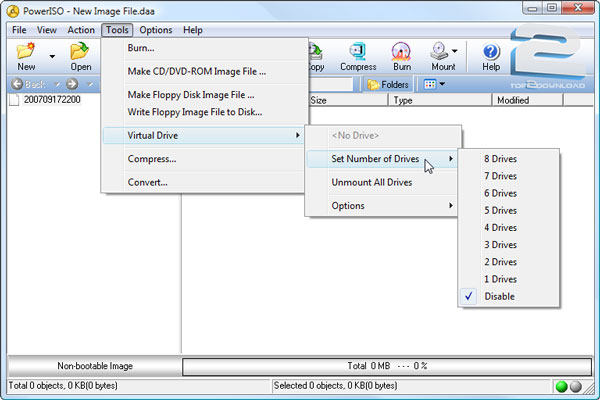
32-bit : link
64-bit : link
Password : www.top2download.com
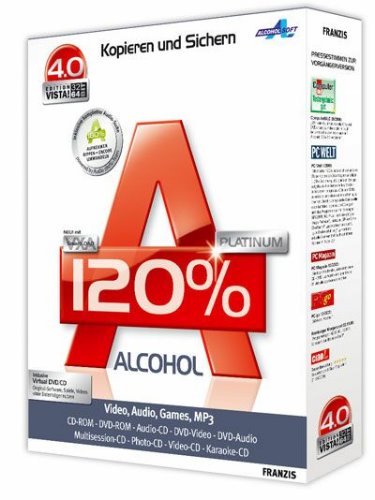
Alcohol 120% has a wizard-based interface where users can create profiles. These profiles are where they can save their settings for copying games, audio, video, data, and other types of media. CDs and DVDs that are used often can be mounted as image files for ease of access. The software can run the Disk's image up to 200 times faster than when having to insert the physical disk in the optical drive. The mounted images from the Disks are listed on the software’s window and can be accessed without having to insert the discs in the drive each time they need to run a program. Alcohol 120% is available for both personal and business use.
Download Link : link

DAEMON tools was originally a successor of Generic SafeDisc emulator and incorporated all of its features. The program claims to be able to defeat most copy protection schemes such as SafeDisc and SecuROM. It is currently compatible with Windows XP, Windows Vista, Windows 7 and Windows 8. DAEMON Tools has a special mode for proper operation of copies of discs with advanced protection (SafeDisc, SecuRom and LaserLock, CDCOPS, StarForce and Protect CD), which are used on some discs with games

Pass : www.top2download.com

